How to Add App Icons in React Native
The app icon is one of the first production assets you should replace before submitting a React Native app to the Apple App Store or Google Play. It appears on the home screen, app stores, settings screens, notifications, search, and device launchers.
This guide explains how to replace icons in a React Native app with native iOS and Android projects.

Quick Answer
For a React Native app:
- iOS icons live in the Xcode asset catalog, usually
ios/<AppName>/Images.xcassets/AppIcon.appiconset. - Android launcher icons live under
android/app/src/main/res/mipmap-*. - Modern Android apps should use adaptive icons with foreground and background layers.
- App store icons are separate from some in-app launcher assets, so prepare both platform assets and store listing assets.
If you are preparing a full release, use this together with the React Native App Release Checklist.
Before You Generate Icons
Prepare a clean square source image.
Recommended source asset:
- square canvas;
- no transparent background for iOS app icon;
- simple shape that works at small sizes;
- enough padding so the icon is not cropped by Android masks;
- high-resolution master file that can generate all platform sizes;
- separate foreground and background layers if you want a proper Android adaptive icon.
Do not use demo icons from a template in production. Replace the app icon, splash screen logo, store icon, screenshots, and all visible branding before submission.
Add a React Native App Icon on iOS
React Native iOS apps use the same icon system as native iOS apps.
- Open the
iosworkspace in Xcode. - Open
Images.xcassets. - Select
AppIcon. - Replace the icon images with your generated iOS icon set.
- Build and run the release or debug app on a simulator.
- Confirm the icon appears on the iOS home screen.
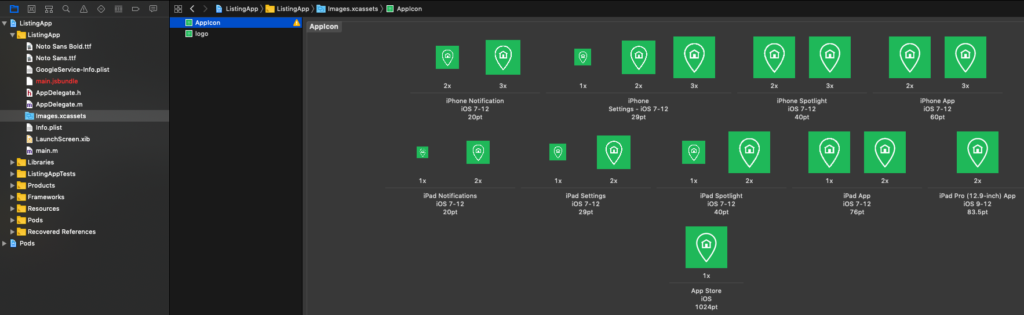
Apple's Human Interface Guidelines explain how app icons should work visually, and Xcode's asset catalog handles the platform-specific icon slots. The practical rule is simple: start from a polished master icon, generate the required iOS sizes, and verify the result on a real device or simulator.
Add a React Native App Icon on Android
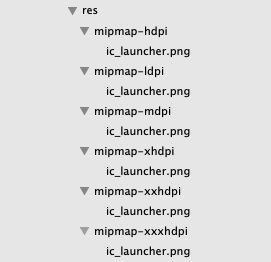
Android launcher icons usually live in:
android/app/src/main/res/
  mipmap-mdpi/
  mipmap-hdpi/
  mipmap-xhdpi/
  mipmap-xxhdpi/
  mipmap-xxxhdpi/
For modern Android apps, use adaptive icons instead of only static PNGs. Adaptive icons let Android apply different masks and visual treatments across launchers.
Common generated files include:
android/app/src/main/res/mipmap-anydpi-v26/ic_launcher.xml
android/app/src/main/res/mipmap-anydpi-v26/ic_launcher_round.xml
android/app/src/main/res/drawable/ic_launcher_foreground.xml
android/app/src/main/res/values/ic_launcher_background.xml
You can generate Android launcher icons with Android Studio:
- Open the
androidfolder in Android Studio. - Right-click
app. - Choose
New > Image Asset. - Select Launcher Icons.
- Configure foreground and background layers.
- Generate the icon resources.
- Build and run the app.
- Confirm the icon appears on the Android launcher.
Store Listing Icons
Launcher icons and store icons are related but not identical.
Before submission, prepare:
- iOS App Store icon in App Store Connect.
- Google Play high-resolution app icon.
- Google Play feature graphic when required.
- App screenshots with the new branding.
- Privacy policy and support URLs that match the submitted app.
Use the store asset sections in the React Native App Release Checklist before uploading a build.
Ship faster with All Access. Get the React Native templates, admin panels, updates, and launch bonuses that help you build faster.
Explore All AccessCommon Problems
The old icon still appears after replacement
Clean the build and reinstall the app. Mobile launchers cache icons aggressively.
Try:
cd ios && xcodebuild clean
cd ../android && ./gradlew clean
Then uninstall the app from the simulator/device and install again.
Android icon looks cropped
Adaptive icons are masked by launchers. Add more padding to the foreground layer and keep important content away from the edges.
iOS icon is rejected
Check that the icon is square, does not rely on transparency, and does not include platform UI elements that violate Apple's icon guidance.
Store icon and app icon do not match
Make sure the store listing icon, launcher icon, splash logo, and screenshots all use the same final brand system.
Release Checklist
Before publishing:
- iOS home screen icon is updated.
- Android launcher icon is updated.
- Android round/adaptive icon is updated.
- App Store Connect icon is updated.
- Google Play icon is updated.
- Splash screen logo is updated.
- Store screenshots show the new branding.
- Demo template branding is removed.
- Release build was installed and checked on both platforms.
Useful Official References
- Apple Human Interface Guidelines: App icons
- Android Developers: Adaptive icons
- Android Studio Image Asset Studio
- Instamobile: Change the App Icon
Bottom Line
Changing a React Native app icon is mostly native platform work: iOS uses the Xcode asset catalog, while Android uses launcher icon resources and adaptive icon layers. Replace icons early, verify them on devices, and check them again before store submission.
Looking for a custom mobile application?
Our team of expert mobile developers can help you build a custom mobile app that meets your specific needs.
Get in Touch