React Native Firebase Storage Integration

Firebase Storage is commonly used in React Native apps for profile photos, posts, chat attachments, marketplace listings, restaurant images, and short videos. The upload code is simple, but production readiness depends on rules, file paths, billing, metadata, and cleanup.
Quick Answer
Use @react-native-firebase/storage for native React Native uploads, validate
files before upload, write user-scoped paths, deploy strict Storage rules, and
store only download URLs or storage paths in Firestore.
If you use an Instamobile app, start with:
- Configure a Firebase Project
- Enable Firebase Storage
- Firebase Costs and Blaze Plan
- Media Upload and Storage
Billing and Bucket Changes
Firebase announced Cloud Storage changes that affect new and existing projects: new default buckets require the Blaze plan to be provisioned, and projects must plan for Blaze requirements to keep using Cloud Storage resources. This does not mean every upload is expensive, but it does mean media upload features need real billing and cost monitoring before production.
For social apps, video apps, and chat apps, treat Firebase Storage as a cost center. Add file limits before launch.
Ship faster with All Access. Get the React Native templates, admin panels, updates, and launch bonuses that help you build faster.
Explore All AccessInstall Dependencies
yarn add @react-native-firebase/app @react-native-firebase/auth @react-native-firebase/storage
yarn add react-native-image-picker
cd ios && pod install
Add your Firebase native config files:
GoogleService-Info.plistfor iOS;google-services.jsonfor Android.
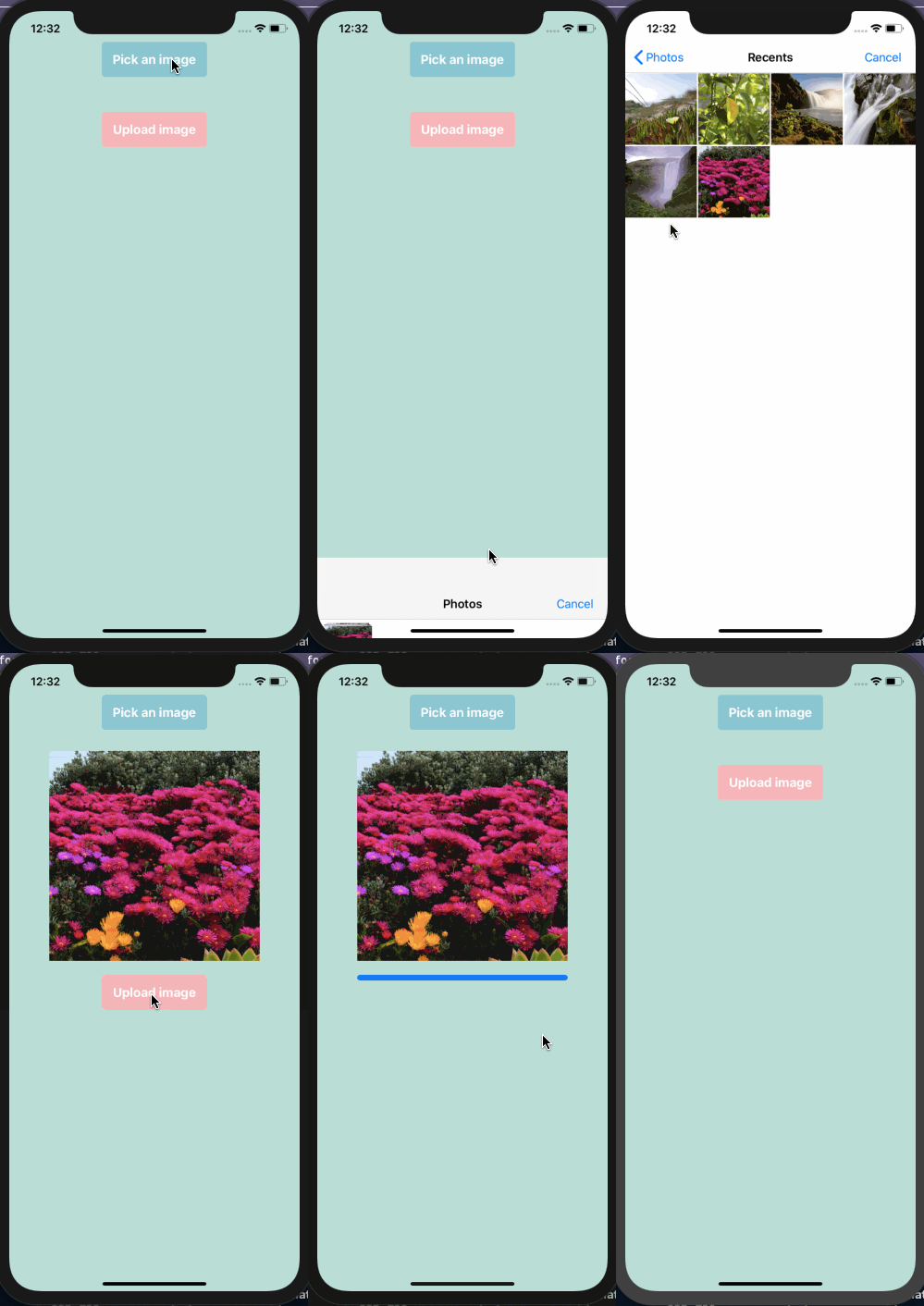
Pick and Upload an Image
Use the current react-native-image-picker API and upload the selected file
with putFile.
import auth from '@react-native-firebase/auth';
import storage from '@react-native-firebase/storage';
import { launchImageLibrary } from 'react-native-image-picker';

export async function pickAndUploadProfilePhoto() {
  const pickerResult = await launchImageLibrary({
    mediaType: 'photo',
    selectionLimit: 1,
  });

  const asset = pickerResult.assets?.[0];
  const uid = auth().currentUser?.uid;

  if (!asset?.uri || !uid) {
    return null;
  }

  const fileName = asset.fileName || `photo-${Date.now()}.jpg`;
  const path = `users/${uid}/profile/${fileName}`;
  const reference = storage().ref(path);

  await reference.putFile(asset.uri, {
    contentType: asset.type || 'image/jpeg',
  });

  const downloadURL = await reference.getDownloadURL();

  return {
    path,
    downloadURL,
  };
}
For feed uploads, store the path, downloadURL, file type, width, height, and
owner UID in Firestore. That makes cleanup and moderation much easier later.
Track Upload Progress
Large media uploads need progress UI:
const task = storage().ref(path).putFile(asset.uri);

task.on('state_changed', snapshot => {
  const progress = snapshot.bytesTransferred / snapshot.totalBytes;
  setUploadProgress(progress);
});

await task;
Do not let users tap "Post" repeatedly while an upload is active. Disable the button or make the upload idempotent.
Storage Rules
Start with user-scoped rules. Adapt paths to match your app's data model:
rules_version = '2';

service firebase.storage {
  match /b/{bucket}/o {
    match /users/{userId}/{allPaths=**} {
      allow read: if request.auth != null;
      allow write: if request.auth != null
        && request.auth.uid == userId
        && request.resource.size < 5 * 1024 * 1024
        && request.resource.contentType.matches('image/.*');
    }
  }
}
These rules are intentionally conservative. Public feeds, chat attachments, and admin uploads need app-specific paths and permissions.
Production Checklist
- Enable Storage only when the app needs media.
- Confirm Blaze plan requirements before marketplace release.
- Validate file size, MIME type, duration, and dimensions.
- Store uploads under user-scoped paths.
- Use App Check where possible.
- Add cleanup for abandoned uploads.
- Use thumbnails for feed lists.
- Avoid listing large buckets from the client.
- Monitor Storage usage after launch.
Useful References
- React Native Firebase Storage reference
- Firebase Cloud Storage pricing plan changes
- Firebase Storage Security Rules reference
- Instamobile Firebase Storage setup
- Instamobile media upload docs
Looking for a custom mobile application?
Our team of expert mobile developers can help you build a custom mobile app that meets your specific needs.
Get in TouchConclusion
Firebase Storage uploads are easy to add, but production apps need strict rules, file validation, billing awareness, and cleanup flows. Build those controls before you ship user-generated media.