Convert a WooCommerce Store into a Mobile App
In this tutorial, learn how to use our React Native WooCommerce template to turn any WooCommerce store into a native mobile app. We assume you have already downloaded the source code and are ready to integrate your own store.
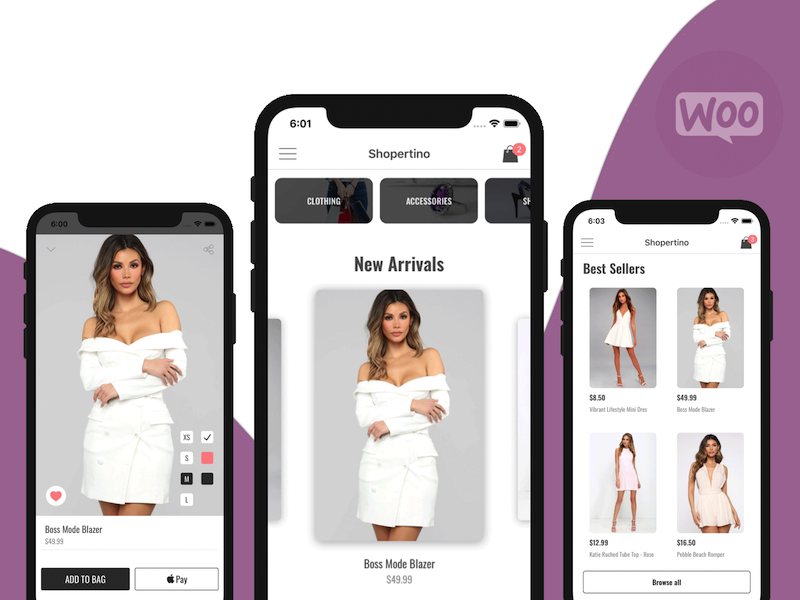
On a high level, you will:
- Run the app on iOS and Android
- Link your own WooCommerce store
- Set up your own Stripe account
- (Optional) Re-skin the app to fit your needs
The app template automatically fetches and displays products, categories, and store information from your WooCommerce website. Users can add products to the cart and start checkout. Orders are placed into your WooCommerce store and payments go through Stripe.
1. Run the app on iOS and Android
Follow the detailed instructions in our documentation to run the app on both platforms. Make sure your environment is set up (Xcode, Android Studio, or a device/emulator) and dependencies are installed.
2. Link your own WooCommerce store
Open src/ShopertinoConfig.js and update the wooCommerceConfig fields with your store information:
wooCommerceConfig: {
	url: 'https://yourstore.com',
	consumerKey: 'ck_xxxxxxxxxxxxxxxxxxxxxxxxxxxxxxxx',
	consumerSecret: 'cs_xxxxxxxxxxxxxxxxxxxxxxxxxxxxxxxx',
},
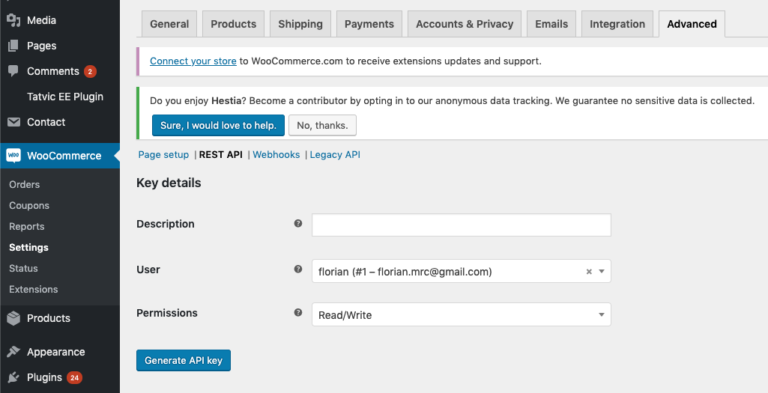
To generate the consumer keys, go to WooCommerce → Settings → Advanced → REST API → Add Key in your WordPress admin. Choose Read/Write permissions. Copy the generated consumer key and consumer secret into ShopertinoConfig.js.
Once configured, rebuild and run the app—you should see your own products and categories.
3. Integrate your own Stripe account
Set up Stripe so you can receive payments from mobile checkout. Follow the Stripe setup guide in our docs to create your account, obtain keys, and configure the app.
4. Optional: Re-skin the app
Customize colors, typography, and components to match your brand. You can adjust styles throughout the project or hand off the source to a developer for deeper changes.
If you run into any issues, reach out—we keep this guide updated based on your feedback.